

REST API
The schakl. web app never talks to the database directly — every screen fetches its data through the same REST API. That API is open to you too. Mint a key, tick what the key may do, and your script, your n8n flow or your integration with another package can get to work, under the same permissions and the same tenant isolation as an employee on screen.
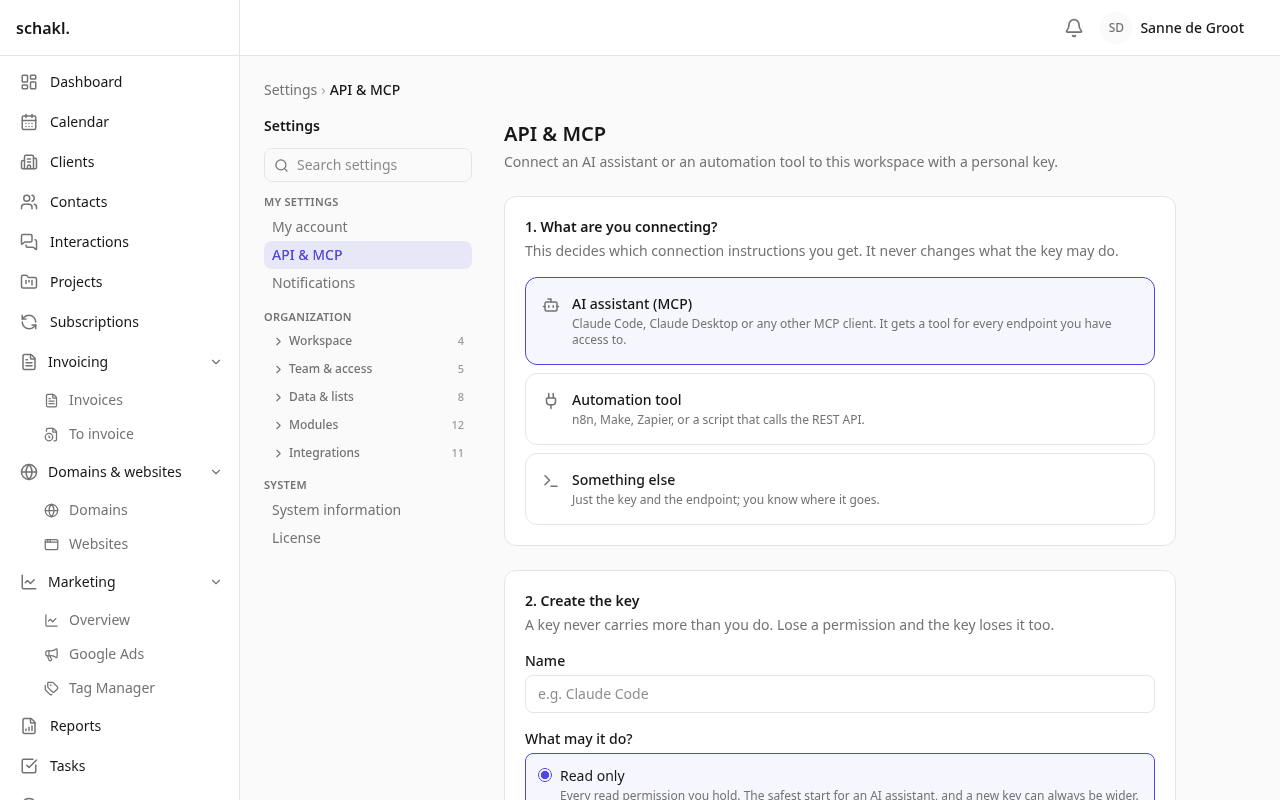
Where to find it
Section titled “Where to find it”- The endpoint list: API reference — every endpoint on this site, grouped by area, each with the permission it requires. Readable without an instance.
- The interactive reference:
https://<your-host>/api/docs(Swagger UI), plushttps://<your-host>/api/redocand the document itself athttps://<your-host>/api/openapi.json. - Personal keys: Instellingen → Mijn account (Settings → My account), the API en MCP block.
- Keys for automation: Instellingen → Service-accounts (Settings → Service accounts), in the “Team & toegang” (Team & access) group.
Use both, for different questions. The reference here is the map — what exists, and what your key has to hold to call it — and it never needs a running server. The one on your instance is the authority: it is generated from the code that is actually running, it knows which modules you switched on, and you can call an endpoint straight from the page.
The instance reference sits under /api/ on purpose: the reverse proxy routes only /api/ and
/mcp to the API container and everything else to the web app. At /docs you land on the app’s
404 page.
Two kinds of key
Section titled “Two kinds of key”| Personal key | Service account | |
|---|---|---|
| Where | Instellingen → Mijn account | Instellingen → Service-accounts |
| Acts as | you | an account of its own, with no person behind it |
| Permissions | your live permissions intersected with the key’s scopes | exactly the scopes ticked |
| When your role changes | the key shrinks with you | unchanged |
| When its creator leaves | the key stops working | keeps working |
For something you need yourself for an afternoon, a personal key is fine. Anything that keeps running (n8n, a nightly script, an integration) belongs in a service account: that outlives the employee who once switched it on.
Minting a key
Section titled “Minting a key”- Go to Instellingen → Mijn account and find the API-sleutels block. For automation, go to Instellingen → Service-accounts instead, create an account with Service-account toevoegen (Add service account), then click Nieuwe sleutel (New key).
- Fill in a Naam (Name) — for example “n8n-automatisering”. That name is the only thing you will recognise the key by later.
- Pick a date under Verloopt op (Expires on), or leave it empty for a key that never expires. A date may be at most a year ahead, and never in the past.
- Tick what the key may do under Scopes. At least one is required. The list only offers permissions you hold yourself: a key can never grant more than its creator has.
- Press Sleutel aanmaken (Create key) and copy the key immediately.
Calling it
Section titled “Calling it”Send the key as Authorization: Bearer … or as X-API-Key: …. Every endpoint lives under
/api/v1/.
curl -H "Authorization: Bearer schakl_…" \ "https://<your-host>/api/v1/companies?limit=50"Use your organisation’s own address: your linked domain, or <slug>.<base domain>. Keys belong
to one organisation — a key presented on another organisation’s hostname simply does not exist
there.
List endpoints take limit and offset and answer with
{ "items": [...], "total": 0, "limit": 50, "offset": 0 }. If you do not need the total, pass
count=false and save a count per call.
Errors
Section titled “Errors”Every error has the same shape:
{ "error": { "code": "not_found", "message": "errors.not_found" } }message is a translation key, not an English or Dutch sentence — the app translates it itself. A
validation failure adds fields, with one such key per field.
| Status | What it means |
|---|---|
| 401 | Unknown, revoked or expired key, or the wrong hostname. Never a 403, so the answer never confirms that a key exists |
| 403 | The key lacks the scope this endpoint declares |
| 404 | Does not exist, or falls outside what this key may see |
| 422 | Validation failure, with fields alongside |
| 429 | More than 600 calls in a minute on the same key |
| 402 | A write against a module whose licence no longer covers it |
n8n and other flows
Section titled “n8n and other flows”n8n needs no separate connector: this is the connector. An HTTP Request node with the header
Authorization: Bearer schakl_… pointed at https://<your-host>/api/v1/… does everything a screen
does. Use a service account for it, not the personal key of whoever built the flow.
The other direction — schakl. calling your flow — is the Webhook aanroepen (Call webhook) action in Automation.
Permissions
Section titled “Permissions”| Permission | What it opens | Default |
|---|---|---|
apikeys.personal.manage | Manage own API keys | Administrator, Member |
apikeys.service_account.manage | Manage service accounts | Administrator |
On top of that, the key itself decides what it may do: every ticked scope is an ordinary permission from the same catalogue as Instellingen → Rollen (Settings → Roles).
Good to know
Section titled “Good to know”- A key never sees more than its owner. If someone works with a restricted client selection, that restriction applies to their key too.
- Intrekken (Revoke) stops a key immediately. Deleting a service account revokes all of its keys. If the owner of a personal key loses their membership, the key stops working.
- 600 calls per minute per key. Generous for automation, and a ceiling if a key ever leaks.
/api/docsand/api/redocload their assets from a public CDN. On a server without internet access that page stays blank;/api/openapi.jsonstill works.- To not serve the reference at all, set
SCHAKL_API_DOCS_ENABLED=falseon the server. The API itself keeps working in full. - On licensed modules, reading and exporting always keep working; only writes answer 402 once the licence stops covering them. See Licenses.