

Domains
The domains module is the register of every domain you look after for a client: who the registrar is, where DNS lives, whether e-mail runs on it, when the renewal falls due and what that renewal costs. What public DNS says about it, schakl. fetches by itself every day.
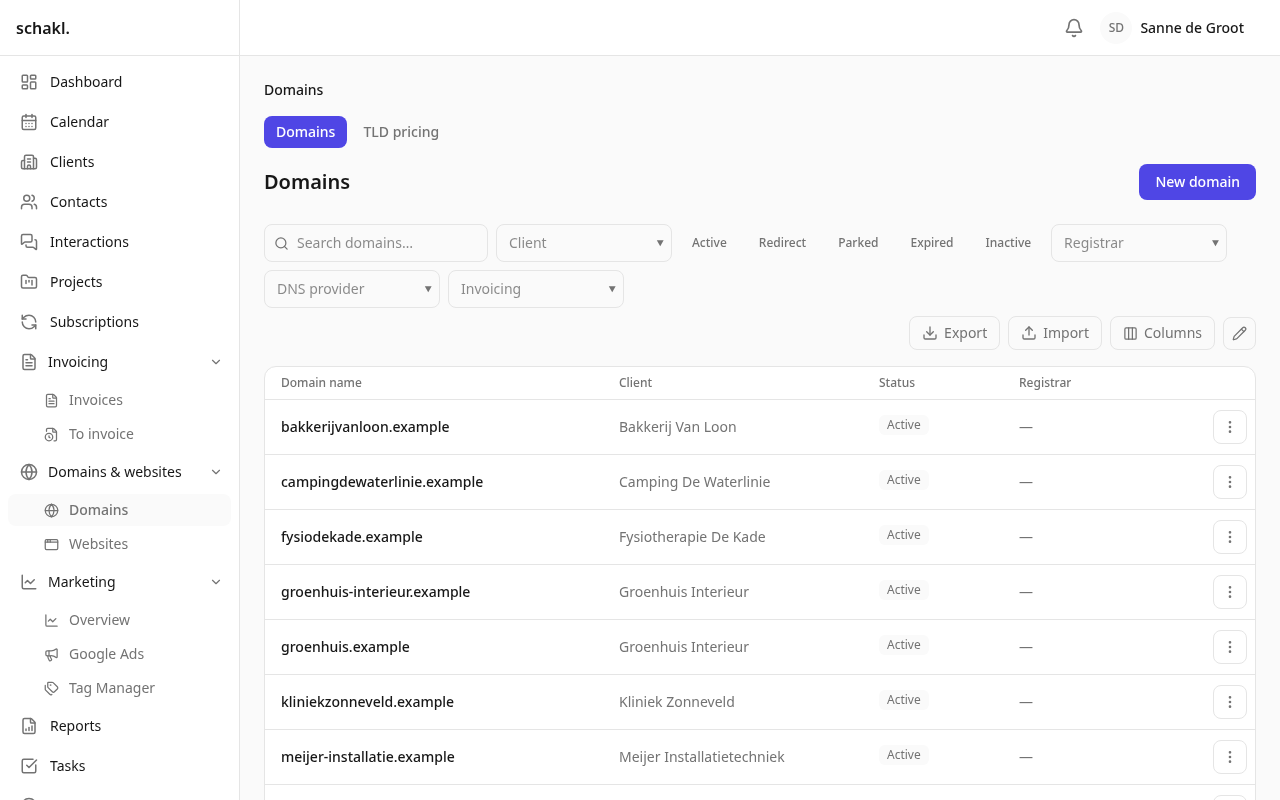
Where to find it
Section titled “Where to find it”In the main menu under Domeinen & websites → Domeinen (Domains & websites → Domains). Two tabs sit above the list: Domeinen and TLD-tarieven (TLD rates). That second tab is also the screen behind Instellingen → Domeinen (Settings → Domains), “TLD-tarieven voor jaarlijkse verlengingsfacturen”. Every client page carries a Domeinen panel with that client’s domains, their price per year and their next renewal.
Recording a domain
Section titled “Recording a domain”Nieuw domein (New domain) opens a single form:
- Domeinnaam (Domain name). What you paste is reduced to the bare domain:
https://WWW.Example.NL/paginais stored asexample.nl. Scheme,www., port and path are stripped, on import too. - Startdatum (Start date). When the registration began. The yearly renewal invoice hangs off it.
- Afwijkende prijs (Agreed price). A price for this domain that overrides the TLD rate. Leave it empty and the extension’s rate is shown as a hint under the field.
- Facturatie (Invoicing). Collapsed on a new domain, with the chosen answers in its header; open when you edit an existing one. It holds “Wel factureren / Niet factureren / Volg het register” and Automatisch factureren (Automatic invoicing).
- Klant (Client), Status (Actief, Doorverwijzing, Geparkeerd, Verlopen, Inactief) and, only on the Doorverwijzing status, Doorverwijzen naar (Redirect to).
- Registrar and DNS-provider, both from your own provider list (Instellingen → Providers), plus a Registratiecontact (Registry contact): the agency, the client, an employee or a contact person.
- E-mail actief (E-mail active); switch it on and E-mailprovider and E-mailcontact appear.
Every picker offers ”+ toevoegen”: a client, contact or provider that does not exist yet is created without leaving the form.
What DNS says for itself
Section titled “What DNS says for itself”Beside the details, the domain page carries a DNS card with Nameservers, MX-records, DNSSEC and Laatst gecontroleerd (Last checked). It is a plain public DNS lookup, so it needs no registrar account and works for every domain. A nightly job refreshes every domain of every organisation, and a new domain is looked up once immediately after you save it, so it never sits on “Nooit” (Never). The Verversen (Refresh) button does it again on the spot.
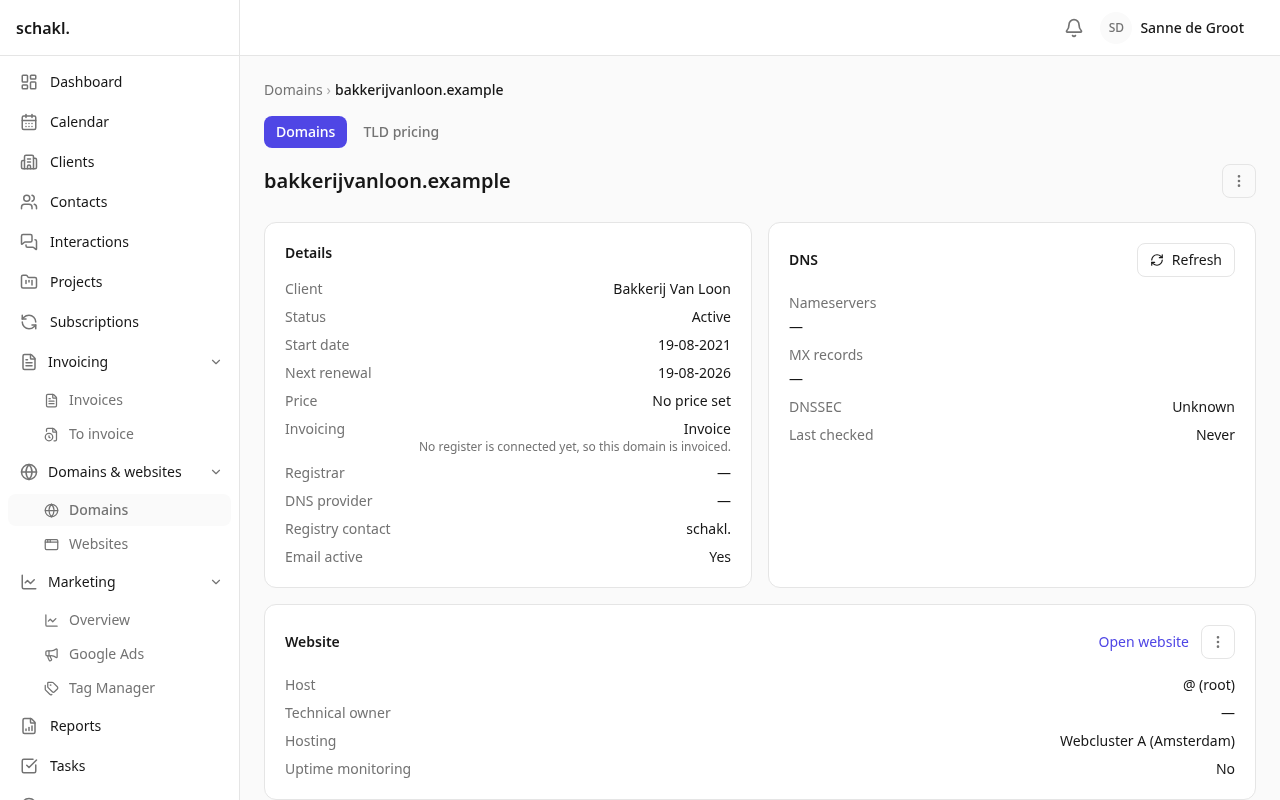
DNSSEC has three answers: Ja, Nee and Onbekend (Unknown). Unknown means the lookup could not answer, not that DNSSEC is off.
Renewal: the date, the price and the invoice
Section titled “Renewal: the date, the price and the invoice”The start date sets the renewal date: schakl. takes the next anniversary still ahead, so a
domain you registered years ago starts at its next birthday and never bills its history. A
nightly job rolls that date a year forward and hands invoicing a line,
Domeinverlenging <name> (<period>). How far that invoice gets on its own is per domain, under Automatisch
factureren, or left on the organisation’s setting. Renewals that no invoice covers yet are
picked in the invoice editor under Nog te factureren domeinverlengingen (Domain renewals still
to invoice).
The price comes from the TLD-tarieven tab: one yearly rate per extension, with history.
- Open Domeinen → TLD-tarieven (or Instellingen → Domeinen).
- Prijs instellen (Set price) asks for the TLD, the Prijs per jaar (Price per year) and Geldig vanaf (Valid from). Today changes it immediately; a future date schedules it.
- For an across-the-board rise: Prijsverhoging (Price increase), with Percentage erbij, Vast bedrag erbij or Nieuw bedrag instellen, a Bereik (Scope: all TLDs or one) and an Ingangsdatum (Effective date).
- Voorbeeld (Preview) shows current → new per TLD and how many domains it touches. Only Doorvoeren (Apply) writes anything.
Bill it, don’t bill it, or follow the register
Section titled “Bill it, don’t bill it, or follow the register”A domain list mixes names you renew with names the client registered themselves and merely asked you to point somewhere. Only a registrar’s register knows the difference, so the Facturatie field has three answers:
| Choice | What happens |
|---|---|
| Wel factureren | The yearly renewal is charged to the client. |
| Niet factureren | Nothing is charged for it. |
| Volg het register | Bill it when a connected register says the agency holds the registration. |
On “Volg het register” a sentence names what decided, for example “Staat in het register van OXXA, dus dit domein wordt gefactureerd” or “Er is nog geen register gekoppeld, dus dit domein wordt gefactureerd”.
List, export and bulk
Section titled “List, export and bulk”The list is the shared table: you pick your own columns (Domeinnaam, Klant, Status, Registrar, DNS-provider, DNSSEC, E-mail actief, Volgende verlenging, Prijs, Gefactureerd, Aangemaakt, plus your own custom fields) and sort on them. Beside the column picker sit Export/Import and the ✎ that switches the checkboxes on. In bulk you can change Status, Klant, Registrar, DNS-provider, E-mailprovider and Facturatie; clearing Facturatie means “follow the register”. The domain name is never bulk-editable — it is the record.
An import upserts on the domain name, normalised, so an export you edit and put back lands on the same rows. Nameservers, DNSSEC, MX, the next renewal date and the resolved price are export-only. The TLD rates are their own importable sheet.
At the bottom of the domain page sits the activity trail: who changed what, and when.
Permissions
Section titled “Permissions”| Permission | Held by default |
|---|---|
domains.domain.read | Administrator, Member, Client |
domains.domain.write | Administrator |
domains.domain.delete | Administrator |
domains.tld_price.read | Administrator, Member |
domains.tld_price.manage | Administrator |
Editable per role under Instellingen → Rollen (Settings → Roles). A colleague or portal login
limited to a subset of clients only ever sees those clients’ domains. If you would rather a client
login did not see the Domeinen menu at all, take domains.domain.read off the Klant role.
Good to know
Section titled “Good to know”- Only the statuses Actief, Doorverwijzing and Geparkeerd renew. Verlopen and Inactief get no renewal date and therefore no invoice.
- With no price at all (no TLD rate and no agreed price) nothing is drafted and the renewal stays outstanding. The moment you price the TLD, billing resumes from the original due date; a year is never silently skipped.
- Deleting a domain takes the website that sits on it with it. Not the other way round: deleting a website leaves the domain alone.
- The Doorverwijzing status is a label on its own. The redirect itself is set up through the Cloudflare integration.