

Websites
Not every domain is a website. The websites module records which of your domains actually carry a
site: on the apex or on www, who manages it technically and which hosting account it runs on.
One website per domain, and that domain settles at once whose client’s site it is.
Where to find it
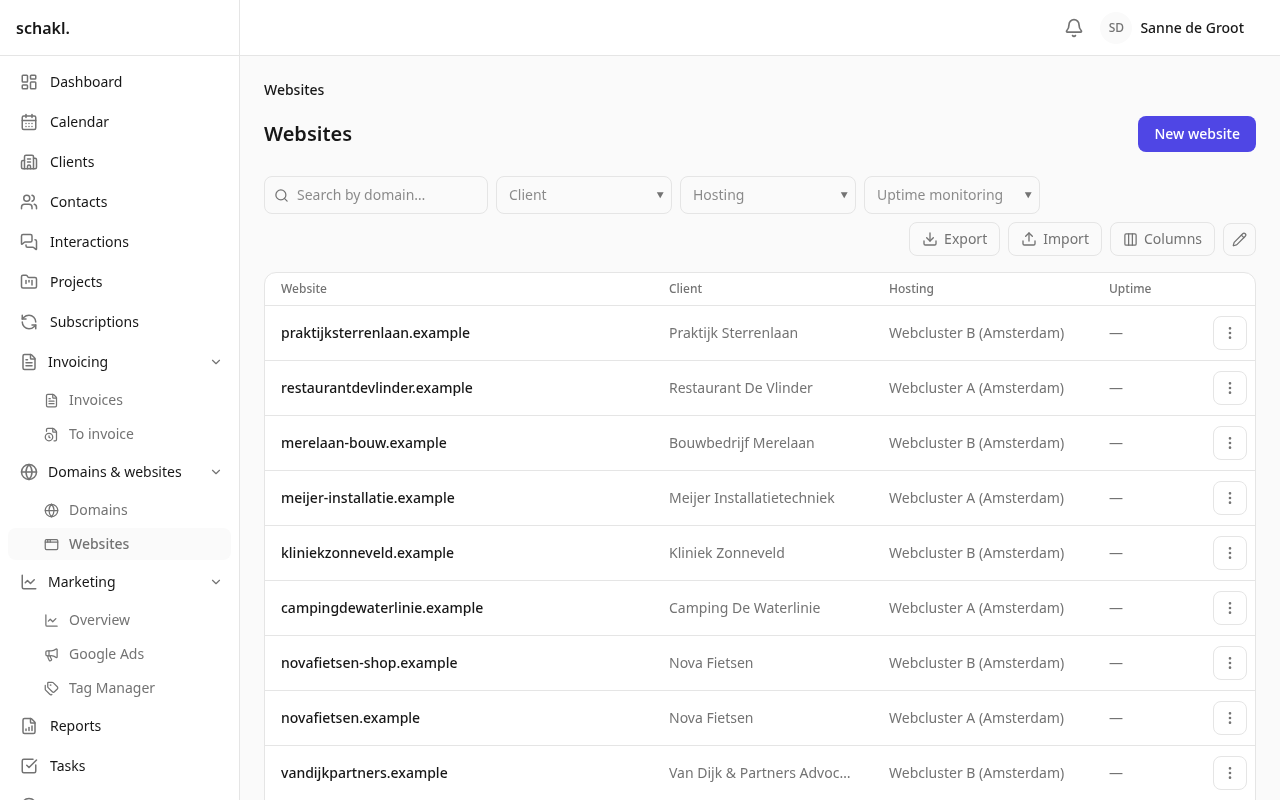
Section titled “Where to find it”In the main menu under Domeinen & websites → Websites (Domains & websites → Websites). That overview is the list; a site’s detail surface is the domain page, where the website has its own “Website” block. Every row in the overview links straight there. Each client page carries a Websites panel listing that client’s sites, their host and their hosting account.
Creating a website
Section titled “Creating a website”Because a website always hangs off a domain, creating one starts with that domain.
- Domein (Domain). The picker only offers domains that do not already have a site. If the domain does not exist yet, type it in the picker: the full domain-create dialog opens and the new domain is selected for you afterwards.
- Host.
@ (root)orwww. This is where the site lives, not where it redirects to. - Technisch beheerder (Technical owner). Not free text but a reference: the agency, the client, an employee or a contact person. The agency by default.
- Hosting. The hosting account the site runs on. Here too you can create a whole new hosting account from the picker; it is selected automatically once saved.
- Uptime-monitoring. A toggle, shown as a green pill in the Uptime column.
You can edit in two places: the ⋯ menu behind a row in the list, or the Website block on the domain page itself. Delete sits in that same ⋯ menu.
The overview
Section titled “The overview”The list is the shared table with your own column choice and server-side sorting: Website
(the domain name, or www.domain), Klant (Client), Hosting, Technisch beheerder,
Uptime and Aangemaakt (Created), plus your own custom fields. Client and hosting sort;
the technical owner does not, because it can be four different kinds of party.
Beside the column picker sit Export/Import and the ✎ that switches the checkboxes on. In bulk you can move a selection to another hosting account (or clear that field) and switch uptime monitoring on or off. Bulk delete is there too; the domains themselves stay.
The technical owner is deliberately absent from the bulk dialog. A party reference has no “leave this one alone” state, so over a selection it would always arrive pre-filled and overwrite everyone by accident.
Import and export
Section titled “Import and export”A website is matched on the domain name it sits on, so an export you edit and put back lands on
the same rows instead of colliding. The columns are domain (required, and not changeable on an
existing row), root (@ or www), hosting, technical_owner and uptime_enabled. The
client travels out with the export but cannot be written: it follows from the domain.
Permissions
Section titled “Permissions”| Permission | Held by default |
|---|---|
websites.website.read | Administrator, Member, Client |
websites.website.write | Administrator |
websites.website.delete | Administrator |
Editable per role under Instellingen → Rollen (Settings → Roles). A colleague limited to a
subset of clients only sees those clients’ websites; a site’s client is its domain’s. If you
would rather a client login did not see the Websites menu, take websites.website.read off the
Klant role.
Creating a website also needs read access to domains: with no domain to attach to, there is nothing to pick.
Good to know
Section titled “Good to know”- One site per domain. A domain that already has a site drops out of the picker.
- Deleting a website leaves the domain alone. Deleting the domain does take the website with it.
- You cannot move an existing site to another domain, not even by import: the domain is the website’s identity.
- Hosting may stay empty. That is an honest state for a site whose server you have not (yet) recorded.
- Websites carry custom fields too. Define them under Instellingen → Aangepaste velden (Settings → Custom fields) for the website type; they appear in the form and as list columns.
- Websites is a licensed module with its own sku. If the licence lapses the list becomes read-only; exporting keeps working and nothing is lost.