

Leave
Leave is about your own employees, not your clients. How many hours a request costs is worked out by the server from that employee’s work schedule on that particular day, never from a rule of thumb like “a day is eight hours”.
Where to find it
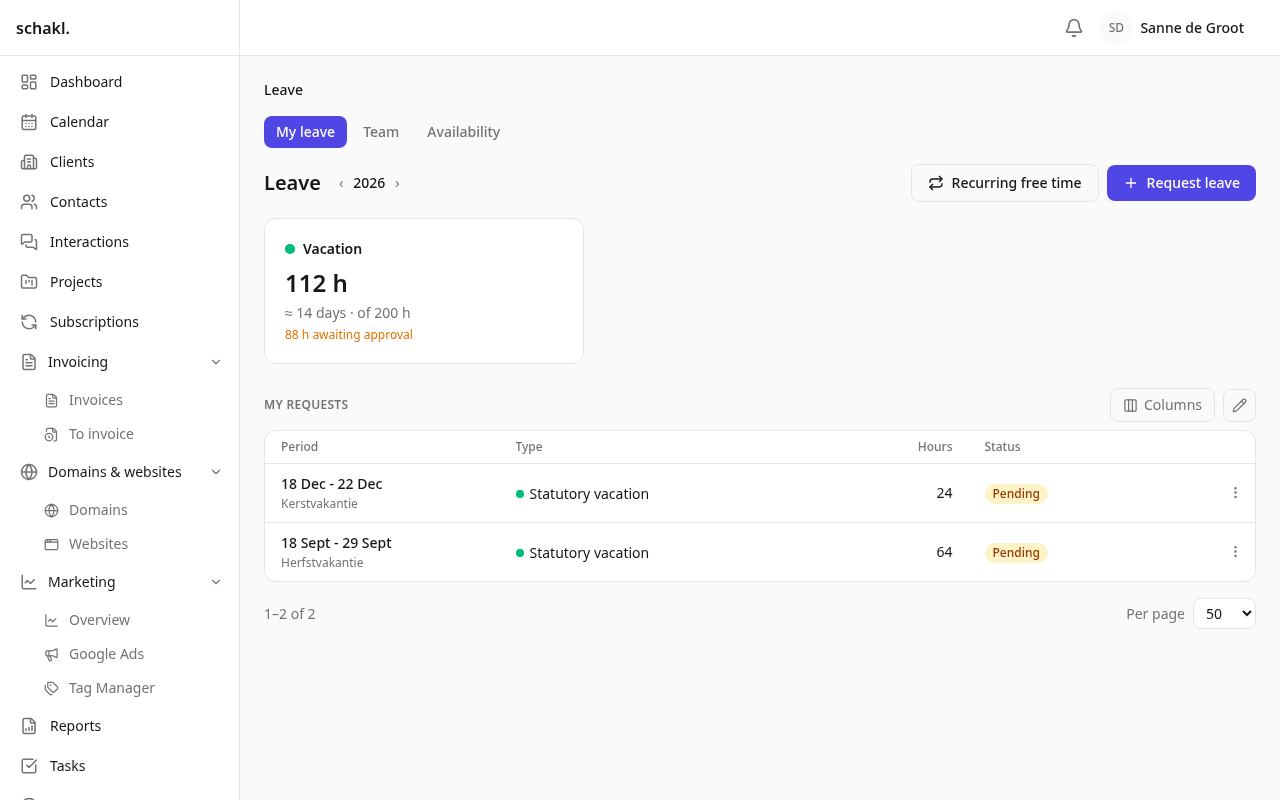
Section titled “Where to find it”Verlof (Leave) sits in the main menu (/leave). Anyone who may approve sees two tabs: Mijn
verlof (My leave) and Team. Organisation-wide configuration lives under Instellingen → Verlof
(Settings → Leave); one employee’s contract, working week and free time under Instellingen →
Team & gebruikers → ⋯ → Dienstverband (Settings → Team & users → ⋯ → Employment), and in the ⋯
menu of the team roster.
Leave is a licensed module, switched on under Instellingen → Modules (Settings → Modules).
Filing a request
Section titled “Filing a request”Mijn verlof shows your balances, your own requests and the Verlof aanvragen (Request leave) button. You pick the Type, the Eerste dag (First day) and the Laatste dag (Last day). Deel van een dag (Part of a day) reveals Van and Tot (From / To); leave one empty and it means the start or the end of the working day.
While you type, the server calculates along: the number of Uren (Hours), the equivalent in working days, and a per-day breakdown naming why a day costs nothing (feestdag public holiday, geen werkdag not a working day, buiten werktijd outside working hours). Ask for more than your balance holds and the form warns but still submits; the manager decides and sees the shortfall again on the approval queue. An approver can depart from the schedule with Uren handmatig instellen (Set hours manually), which is recorded against their name.
Approving
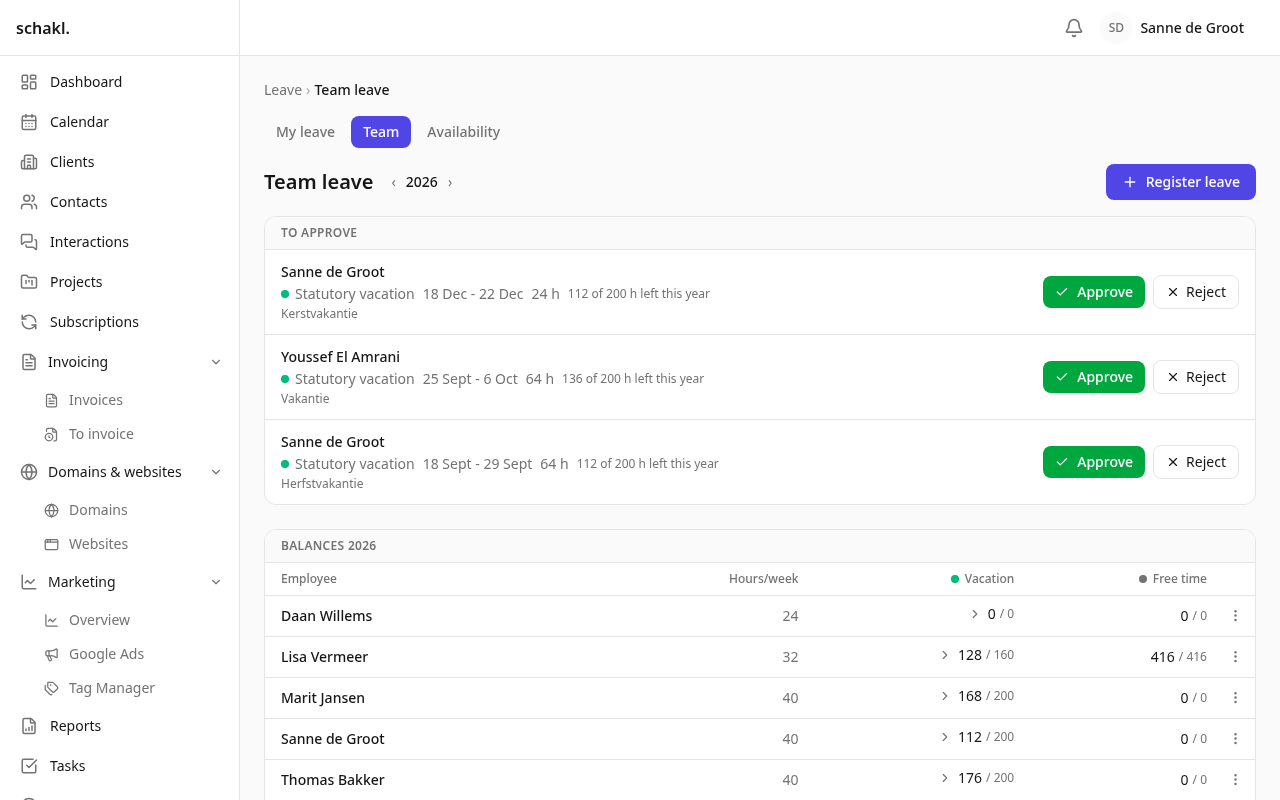
Section titled “Approving”Verlof → Team opens with Goed te keuren (To approve). Each request shows its hours, what would be left of the yearly balance, and whether the balance would be exceeded. Goedkeuren (Approve) and Afwijzen (Reject) work per row or over a selection; rejecting lets you add a reason. A request edited after approval returns labelled Bewerkt, opnieuw ter goedkeuring (Edited, awaiting approval again). Verlof registreren (Register leave) records leave in a colleague’s name, a sick day for instance. Below that sit the whole team’s balances and requests per year.
Balances, groups and expiry
Section titled “Balances, groups and expiry”Leave types sharing a balansgroep (balance group) present the employee with one figure. Out of the box those are Wettelijke vakantie (statutory vacation: 4 weeks a year, carry-over expiring after 6 months) and Bovenwettelijke vakantie (extra-statutory: 1 week, 60 months), shown together as Vakantieverlof. The pots stay separate, so the distinction and the differing expiry dates survive. Consumption favours the employee: a request draws from the pot that expires soonest first. The balance card says what is expiring soon and what has lapsed.
Yearly entitlements are derived from the contract and recalculated the moment that contract changes. An entitlement set by hand under Instellingen → Verlof → Contract & saldi (Contract & entitlements) is marked Handmatig (Manual) and is never overwritten by that recalculation.
Working week, contract and free time
Section titled “Working week, contract and free time”The Dienstverband wizard has three steps: Contract (start, end or open-ended, contract hours per week), Werkweek (Working week: per weekday a working window with any number of break windows, plus a button to copy the day onto the other working days) and Vrije tijd (Free time). Hours per week is derived from the schedule, never typed. A changed contract is a new row rather than an edit, and Beëindigen (Terminate) only records the end date, which is what keeps last year’s leave priced at last year’s roster.
The third step asks the one question nothing can infer: how does this employee get the hours below the full-time norm? As free time to schedule themselves, Built into the roster (nothing accrues), or An agreed number of hours. With the first choice you place a pattern right away: a number of days per year (spread on the same weekday, sliding past public holidays so the count still lands) or a fixed rhythm (“every two weeks on Friday”). Those days go onto the calendar as pre-approved leave, and the Vrije tijd card on Mijn verlof offers Verplaatsen (Move) or Annuleren (Cancel) per day.
Setting it up
Section titled “Setting it up”-
Verloftypen (Leave types): a name per language, colour, paid, counts towards a balance, requires approval, weeks per year, expiry, balance group, and how the calendar draws it (Hele dag all day, or Per uur by the hour). Six are seeded, among them Ziek (Sick: no approval, no balance).
-
Standaard werkrooster (Default work schedule): the week everyone without their own follows. Out of the box 08:30–17:00 with a 12:30–13:00 break, so 8 hours a day.
-
Goedkeuringsbeleid (Approval policy): self-approval is off, so an approver’s own request goes to the other approvers. An organisation with a single approver may always manage its own.
-
Terugkerende vrije tijd (Recurring free time): how far ahead free days are placed for an open-ended contract. A contract with an end date is filled up to that date.
-
Uurtarief (Hourly rate): the default rate for everyone without one of their own.
-
Feestdagen (Public holidays): press the import button (it names the year), then switch off the days you actually work. Every December a background job tops up the following year.
Elsewhere in the platform
Section titled “Elsewhere in the platform”Approved leave appears as its own Verlof row on the weekly timesheet under Uren (Time) and never counts as worked time. In the calendar, Verlof (team) and Feestdagen are two separate feeds; dragging a day moves the request, after which the server recalculates the hours and asks for approval again if it has to. Three dashboard widgets exist: your own balance, the queue waiting on you, and who is away today. With the Google Workspace integration on, approved leave is mirrored into the employee’s own Google Calendar.
Permissions
Section titled “Permissions”| Permission | Default |
|---|---|
leave.request.read | Member: own · Administrator: anyone’s |
leave.request.write | Member: own · Administrator: anyone’s |
leave.request.approve | Administrator |
leave.entitlement.read | Member: own · Administrator: anyone’s |
leave.entitlement.write | Administrator |
leave.type.write | Administrator (opens Instellingen → Verlof) |
leave.profile.manage | Administrator (schedules and contracts) |
leave.holiday.write | Administrator |
leave.rate.read | Member: own · Administrator: anyone’s |
leave.rate.write | Administrator |
The hourly rate is deliberately kept off leave.profile.manage: someone may manage schedules
without seeing pay. Roles are configured under Instellingen → Rollen (Settings → Roles).
Good to know
Section titled “Good to know”- Leave in the past can only be recorded or changed by someone who may write other people’s leave (an admin). With self-approval off, their own past is locked too.
- An approved request is never retroactively recalculated. A holiday you add later therefore does not rewrite last year’s balance.
- Overlapping requests, and spans containing no scheduled hours at all, are refused rather than stored.
- Only the Dutch public-holiday calendar is generated. For another country you add the days by hand.
- Leave has no import or export: records carrying an approval are meant to be requested.
- The Goed te keuren queue does not page; that list is meant to be emptied.