

Projects
A project is a client engagement with a budget attached. It is the thing hours get logged against, the thing tasks hang off, and the place you find out whether you are still inside the agreement — before the month is over.
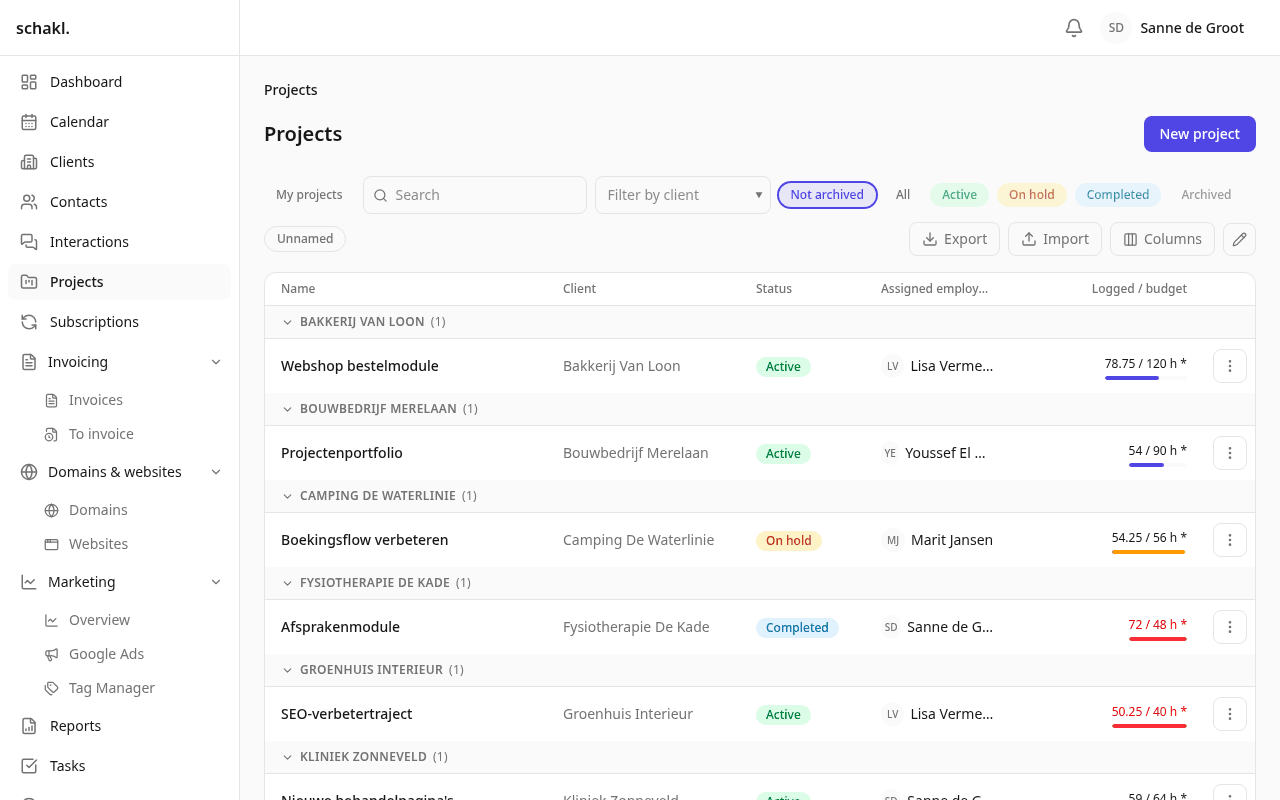
Where to find it
Section titled “Where to find it”Projecten (Projects) in the main menu. Every client also carries a Projecten panel on their client record, with a + Nieuw project button that fills the client in for you. Projects is a licensed module: you switch it on under Instellingen → Modules (Settings → Modules), and Instellingen → Licentie (Settings → License) decides whether it is covered.
Creating a project
Section titled “Creating a project”The fields that decide how a project behaves:
| Field | What it does |
|---|---|
| Klant (Client) | What the project hangs off; may be empty for internal work |
| Toegewezen medewerkers (Assigned employees) | One Verantwoordelijke (responsible) plus as many others as you like |
| Status | Actief, On hold, Afgerond (completed) or Gearchiveerd (archived) |
| Budget (uren) | The hours budget logged time is measured against |
| Budgetperiode (Budget period) | Whole project, per month, per week or per day |
| Budget (bedrag) | The money budget, in your organisation’s currency |
| Standaard facturabel (Billable by default) | Decides how new time entries on this project start |
| Startdatum / Einddatum | Free to fill in |
On creation the project inherits the client’s Verantwoordelijke (responsible) as its own responsible, not the whole roster of staff attached to that client. That person is also the default assignee of new tasks on the project.
The Omschrijving (description) is a rich-text field: you can @mention colleagues in it and
reference other tasks with #.
The budget bar
Section titled “The budget bar”The Budgetperiode decides what “logged” means. Hele project counts everything from the start; Per maand resets on the first of the month, Per week on Monday, Per dag every day. The boundary is midnight in your organisation’s timezone (Instellingen → Huisstijl, Settings → Branding), not UTC — so an hour logged at 23:30 on 31 January counts in January.
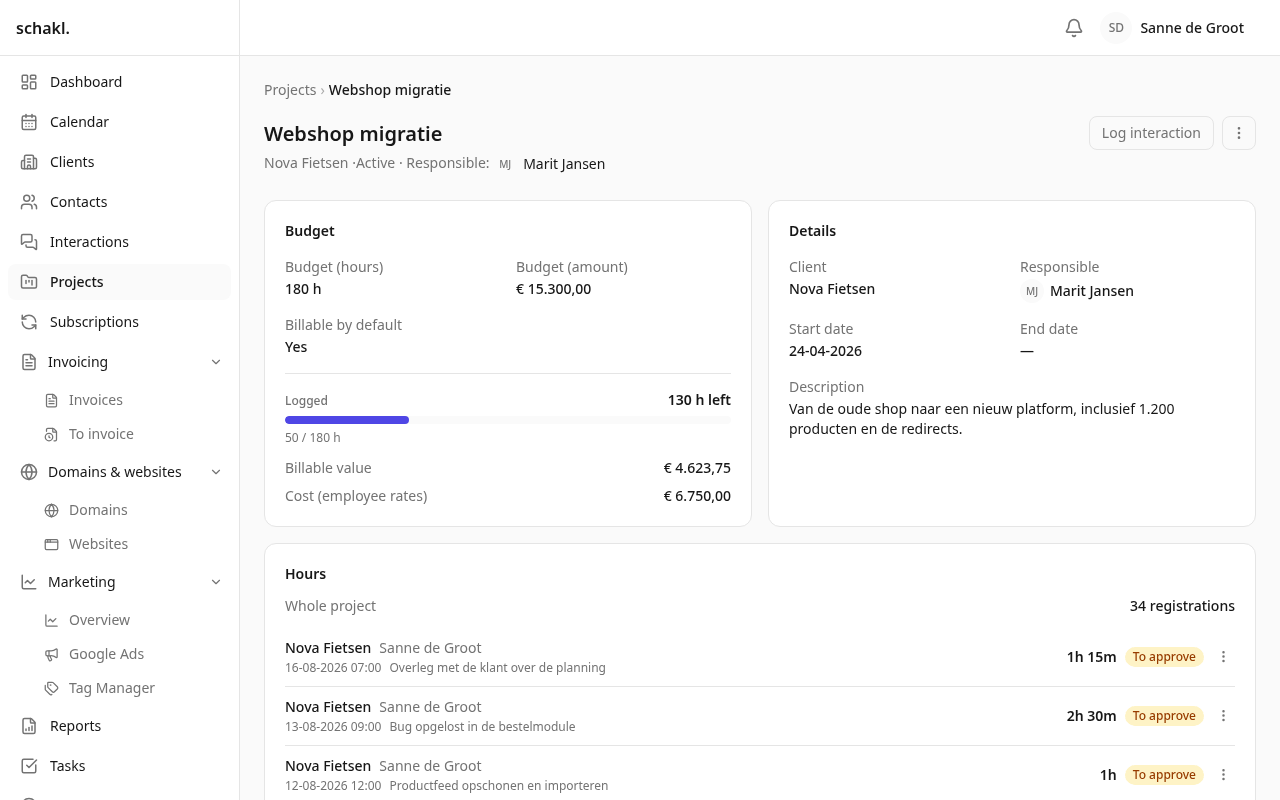
The project page shows Geboekt deze maand (“logged this month”, or this week, today, or just Geboekt) with the bar underneath. The bar stops at 100 %; the number does not, so a project at 140 % reads as 140 %. The same figures appear on the list in the Beschikbare uren (available hours) column.
With the right permissions you also get Facturabele waarde (billable value) and Kosten (medewerkerstarieven) (cost at employee rates). Every hour is priced at the rate of whoever logged it; hours booked by people with no rate are called out separately and left out of the total. There is no project-level rate.
Hours that come from a subscription
Section titled “Hours that come from a subscription”Link a project to a live subscription that carries Inbegrepen uren (included hours) — in the subscriptions module, field Gekoppelde projecten (linked projects) — and the hours budget comes from that agreement. Several subscriptions add up. Budget (uren) then greys out, the budget period is fixed to Per maand, and the page says Uren uit abonnement with the agreement’s name beside it.
On the project page
Section titled “On the project page”- Taken (to-dos): the project’s own list. Add a line, tick it off, and drag it by the ⋮⋮ handle to reorder. Done-of-total sits top right.
- Documenten: upload, download and delete files; every upload lands on the activity trail.
- Contactmoment vastleggen (log interaction) in the header, when the interactions module is on: the project and its client are already filled in.
- Panels contributed by other modules: Uren (hours), Contactmomenten and Abonnementen.
- At the bottom the activity trail: who changed what and when, with the old and new value.
The list
Section titled “The list”Search, a client filter and a Mijn projecten (my projects) toggle that keeps only the projects you are on. You choose your own columns; that choice is personal and is remembered. Sorting works on name, status, assigned employee, budget and the dates.
The ✎ switches the checkboxes on and lets you change a whole selection at once: status, client and billable by default. Budgets are deliberately absent — a budget is agreed per project. Deleting works from the same selection.
An import recognises an existing project by its name and updates it; the rest are created.
The company column matches on the exact client name. See
Import & export.
Permissions
Section titled “Permissions”| Permission | Held by default |
|---|---|
projects.project.read | Administrator, Member, Client |
projects.project.write | Administrator |
projects.project.delete | Administrator |
The owner role holds everything. You set this per role under Instellingen → Rollen (Settings
→ Roles). The money figures on the project page hang off two further permissions:
Urenoverzicht en rapportages bekijken (time.report.read) and Uurtarieven bekijken for
everyone (leave.rate.read:any). Without both you see the hours bar but no amounts.
Good to know
Section titled “Good to know”- Deleting a project takes nothing with it. Tasks and time entries stay; they simply lose their project link.
- The budget bar counts the whole team’s hours, not only yours.
- Custom fields can be added per project under Instellingen → Aangepaste velden (Settings → Custom fields); they appear in the form, on the page and in the export.
- The Dashboard carries a Projectbudgetten (project budgets) widget: the budgeted projects burning hottest.
Read next
Section titled “Read next”- Tasks — the board a project’s work lands on
- Clients — the record the projects panel sits on
- Import & export